NetDocuments Certified Partner · UK

Your Documents.
Your Knowledge.
Connected.

Certified UK NetDocuments implementation, migration, and AI specialists. We help law firms deploy the world's #1 trusted cloud DMS — and unlock the full power of their institutional knowledge.

SOC 2 Type 2 ISO 27001 FedRAMP GDPR HIPAA
Connected knowledge graph of documents, matters, and people
NetDocuments Certified File System Migration badge

Certified NetDocuments File System Migration Specialists

Officially certified by NetDocuments for file system migration — meaning your documents, versions, and permissions are moved safely using proven, audited methodology. Not every partner holds this credential.

See Migration Services
7,000+
Organisations worldwide trust NetDocuments
99.9%
Guaranteed service uptime
25+
Years of cloud-native legal expertise
150+
Native integrations including Microsoft 365
80%
Of law firms have now adopted AI
Why NetDocuments

Context Changes Everything

For over 25 years, NetDocuments has been the world's #1 trusted cloud-native document management system built specifically for legal professionals. Unlike legacy on-premises systems retrofitted for cloud, every layer of NetDocuments — from its architecture to its AI — was designed for the cloud from day one.

🏗

No hardware. No servers. No patching.

Predictable monthly pricing with zero capital expenditure.

99.9% guaranteed uptime

Your documents are always available, from any device, anywhere.

🔄

Instant feature updates

New capabilities deploy automatically — no upgrade projects.

🛡

Proven business continuity

When disruption hits, cloud firms keep working.

Context Graph: The Future of Legal Knowledge

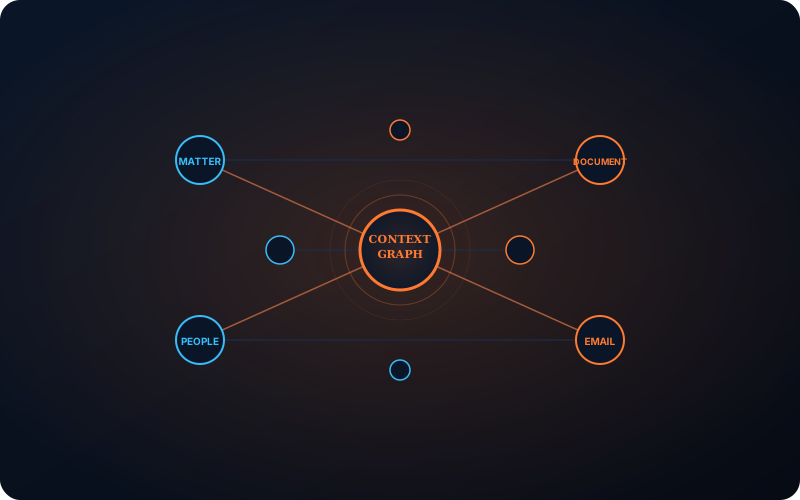
Announced May 2026, the Context Graph is the legal industry's first knowledge infrastructure that understands how your firm's work connects. It continuously maps the relationships among every matter, document, communication, and person across your entire repository.

Context Graph diagram showing matters, documents, people, and email connected as a knowledge network
The Context Graph continuously maps every matter, document, email, and relationship across your repository — within your existing security permissions.
01

Connects Everything

Every matter, document, email, and relationship mapped across hundreds of millions of records.

02

Preserves Security

Respects all existing permissions and ethical walls. Zero leakage.

03

Powers Semantic Search

Search by meaning, not keywords. Ask questions in natural language.

04

Enables AI Agents

AI works from your real institutional knowledge, not uploaded documents.

05

Stops Knowledge Walk-Out

When a partner retires or a fee earner leaves, their knowledge stays.

“You cannot retrofit this. It has to be built into the core.”

— Dan Hauck, Chief Product Officer, NetDocuments

“Legal data is fundamentally different. Unlocking its meaning requires understanding it as a connected whole.”

— Josh Baxter, CEO, NetDocuments

The Context Graph is built in partnership with AWS and Elastic for enterprise-grade scale. Gartner named context engineering a strategic priority. Foundation Capital called context graphs “the next defining shift in enterprise AI.”

The Numbers Don't Lie

7,000+
customers — the platform is battle-tested at scale
98%
customer retention — firms that switch, stay
89%
of legal IT leaders considering cloud
£1.7m
/year cost of poor data management
25%
of law firms have experienced a breach

Why NetDocuments Over Competitors

Feature NetDocuments Legacy On-Prem DMS Generic Cloud DMS
Cloud-native architecture ✅ Built cloud-first ❌ Retrofitted ⚠ Generic, not legal-specific
Legal-specific design ✅ Purpose-built for legal ✅ Legal-specific ❌ Horizontal/generic
Context Graph ✅ Industry-first ❌ Not possible ❌ Not possible
AI within security boundary ✅ Data never leaves the DMS ❌ Requires external upload ❌ Requires external upload
Microsoft 365 integration ✅ Unmatched depth ⚠ Limited ⚠ Basic
Ethical walls & governance ✅ Native, granular ⚠ Bolt-on ❌ Minimal
25+ years legal expertise
Our Services

Everything You Need to Deploy, Migrate, and Optimise

As certified NetDocuments partners, we deliver the full spectrum of services your firm needs — from initial deployment through to AI-powered automation and ongoing adoption.

🚀

Implementation

Full deployment: design, configuration, go-live, adoption.

📦

Document & Email Migration

Secure, audited migration from iManage, Worldox, Documentum, file shares.

🤖

AI & Automation

Deploy ndMAX, Context Graph, PatternBuilder MAX, and Copilot integration.

🔌

Systems Integration

Microsoft 365, Outlook, practice management, and API integration.

🔐

Security & Compliance

Ethical walls, DLP, encryption keys, access governance.

🎓

Training & Adoption

Role-based training, train-the-trainer, ongoing optimisation.

Implementation Done Right — The First Time

Deploying a DMS is one of the most significant technology decisions your firm will make. Get it wrong, and you'll spend years working around poor configuration. Get it right, and your firm gains a productivity engine that compounds value daily.

What Our Implementation Includes:
  • Needs Assessment & Discovery — Stakeholder interviews, workflow analysis, systems audit
  • Cabinet & Workspace Architecture — Designed around how your firm actually works
  • Security Model Design — Ethical walls, access groups, profile-based security, or Workspace Security Manager
  • Metadata & Profile Configuration — Document types, attribute mapping, lookup tables
  • Microsoft 365 Integration — Word, Outlook, Teams — seamless filing from where fee earners work
  • Pilot Deployment — Single practice group before firm-wide rollout
  • Go-Live Support — On-site and remote support during critical transition
  • Post-Deployment Handoff — Knowledge transfer to your admin team with documentation
Our 12-Point Implementation Checkpoint Framework:
  1. Project kickoff & stakeholder alignment
  2. System analysis & performance modelling
  3. Repository & cabinet design
  4. Security model configuration
  5. Metadata & profile setup
  6. Microsoft 365 & integration configuration
  7. System education & admin training
  8. Test & acceptance phase (sample migration)
  9. Pilot / practice group rollout
  10. Firm-wide deployment
  11. Post-deployment support transition
  12. Continuous improvement & optimisation

Migration Without Drama, Data Loss, or Downtime

Data migration is the highest-risk part of any DMS project. We've mastered a proven 9-phase methodology that ensures every document, every version, and every permission arrives correctly.
NetDocuments Certified File System Migration badge
NetDocuments Certified File System Migration

We hold the official NetDocuments File System Migration certification — your migration is handled by certified specialists using approved tools and audited methodology.

We Migrate From:

iManage (WorkSite) · OpenText eDOCS · Worldox · Documentum · SharePoint / file shares · Shared network drives · Email archives (.PST, Exchange)

Our 9-Phase Migration Methodology:
1Design & Build — Source data analysis, metadata/attribute mapping, transformation rules, cabinet structure design
2Extraction — Extract documents and metadata from source system using certified tools
3Transformation — Apply mapping rules in SQL database — folder structures, client/matter mapping, metadata normalization
4Test Migration — Full migration into a Test Cabinet — validate, audit, iterate. Throw-away run.
5Alpha Migration — Full production import. Veil Groups restrict access until go-live sign-off.
6Delta Migration — Process only changes since Alpha — capture work-in-progress during transition.
7Go-Live — Veil Groups removed. Full access activated. Users start working in NetDocuments.
8Audit — Exception reporting, compliance documentation, full reconciliation against source.
9Post-Migration — Decommission source system, archive backups, finalise documentation.
Tools We Use:
  • ndImport — Certified bulk import tool for document migration
  • ndToolKit — Administrative tool for security, profiles, and workspace management
  • SQL-based transformation — Custom mapping, validation, and cleansing pipeline
  • Veil Groups — Secure access control during migration transition
Risk Mitigations We Build In:
  • Complete source system backup before extraction
  • Veil Groups to prevent premature access
  • Full exception reporting with automated reconciliation
  • Audit trail matching the official NetDocuments audit template
  • Metadata validation at every transformation step
Bring AI to Your Content — Not Your Content to AI

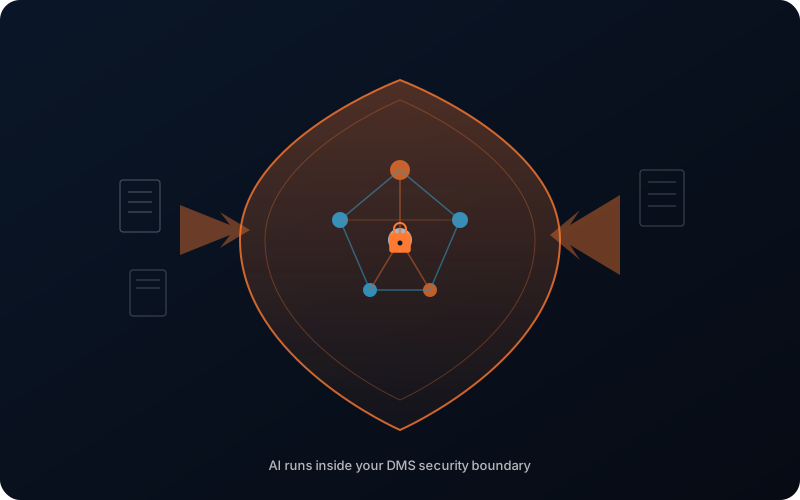
The most important strategic decision in legal AI isn't which AI tool to buy. It's where your AI runs. NetDocuments' philosophy is simple: rather than taking your content to AI, we bring AI to your content.

What this means: Your documents never leave the security boundary of your DMS. AI processes your data inside the same permission-governed environment that protects it every day. No data retention by AI vendors. No training on your content. No ethical wall breaches.

AI neural network operating inside a secure shield boundary with documents flowing in
AI runs inside your DMS security boundary — your content never leaves to reach the AI.
The ndMAX AI Suite We Deploy:
Context Graph (2026 Launch)

The knowledge infrastructure that powers everything. Continuously maps relationships across your entire repository. Enables semantic search, instant matter onboarding, and permission-aware AI agents.

ndMAX Legal AI Assistant

Select up to 100 documents and ask questions in natural language. Find information, create summaries, draft responses, compare clauses, translate languages.

“AI customers ask the Legal AI Assistant an average of 4 times per week”

ndMAX AI App Builder

Low-code platform to build custom AI applications for your firm's specific workflows — contract review, due diligence, lease analysis, litigation document review.

“An app built with the AI App Builder could save over 1,500 hours of work a year.” — Jared Gullbergh, Buchanan

PatternBuilder MAX

Automated document assembly with AI-powered clause libraries. Generate documents from interview prompts. Build workflows that automate routine legal work.

Microsoft Copilot Integration

Search NetDocuments from within Microsoft Teams and Outlook. File documents by voice. Ask Copilot about matter status without leaving your email.

ndConnect / MCP Integration

Connect external AI tools — Claude, ChatGPT, and other legal AI platforms — directly to your NetDocuments knowledge graph through the Model Context Protocol. External AI agents gain permission-aware access to your institutional knowledge.

80% of law firms have adopted AI (up from 37% in 2024). The question isn't if — it's how securely.

NetDocuments Meets You Where You Work

Your fee earners don't want to learn a new interface. They want to work in Word, Outlook, and Teams — and have documents file themselves. That's exactly what we deliver.

IntegrationWhat It Delivers
Microsoft 365 (ndOffice)Native Word, Excel, PowerPoint integration. File, open, version, and co-author from within Office apps
Outlook (ndMail)One-click email filing with AI-assisted matter suggestions. Profile and file emails without leaving Outlook
Microsoft TeamsAccess NetDocuments workspaces directly in Teams channels. Copilot integration for natural language queries
Practice Management SystemsTwo-way sync with elite, Proclaim, Clio, Lexzur, and other PMS platforms
Power AutomateAutomated workflows connecting NetDocuments to 150+ business applications
DocuSignNative e-signature integration — send for signature without leaving NetDocuments
Custom APIREST API for bespoke integrations with bespoke business systems
“Competitors simply could not match what NetDocuments was offering in the way of these Microsoft integrations.” — Senior Corporate Counsel, Biotech Company

Security That's Invisible — Because It's Built In

UK law firms face the strictest regulatory environment in legal history. The SRA, GDPR, LCS (Legal Privilege), and growing client scrutiny demand a document management platform with security that's not bolted on — it's structural.

What We Configure:
Ethical Walls & Access Governance
  • Workspace Security Manager (WSM) — Scalable ethical walls that automatically enforce need-to-know access
  • Profile-Based Security (PBS) — Document-level security based on client/matter profiles
  • Granular permission inheritance — Control access at repository, cabinet, workspace, folder, and document level
Data Loss Prevention (DLP)
  • External sharing controls — block or warn before documents leave the firm
  • Policy-based rules — prevent PII, financial data, or privileged content from being shared externally
  • Audit trails — comprehensive logging of every access, edit, share, and download
Encryption Architecture
  • Per-document Object Encryption Keys (OEK) — Every document encrypted with a unique key
  • Master Encryption Key (MEK) at repository level
  • Customer-Managed Keys — Optional BYOK (Bring Your Own Key) for maximum control
  • Hardware Security Modules (HSMs) — FIPS 140-2 Level 3 certified key protection
  • Quantum-resistant random number generation for key creation
Ransomware Protection
  • ndSync Circuit Breaker — Automatically detects and halts mass upload patterns characteristic of ransomware attacks
  • Immutable version history — ransomware can encrypt copies but cannot destroy originals
  • Rapid recovery — restore to any point in time
Audit & Compliance
  • Consolidated Activity Log — every action tracked, searchable, and exportable
  • Version Management — complete document history with access-controlled versions
  • Data retention policies — automated lifecycle management per regulatory requirements

Technology Only Works When People Use It

The #1 reason DMS deployments fail isn't technical — it's adoption. We've seen firms spend six figures on implementation only to have fee earners continue saving documents to their desktop.

Our Training Approach:
  • Role-Based Training — Different sessions for Partners, Fee Earners, Legal PAs, IT, and Records staff
  • Train-the-Trainer — We build internal champions who support ongoing adoption
  • Super-User Programme — Identify and empower power users within each practice group
  • Workflow-Specific Sessions — Training built around actual firm workflows, not generic features
  • Adoption Metrics — Track filing rates, search usage, and AI engagement post-go-live
  • Ongoing Optimisation — Quarterly reviews to tune configuration based on real usage patterns
Our Process

A Proven Methodology. No Surprises.

We don't improvise. Every engagement follows our structured 5-phase delivery framework, refined across multiple implementations and aligned with NetDocuments' official partner methodology.

1
Phase 1

Discovery & Design

Weeks 1-4
What Happens:
  • Stakeholder interviews across Partners, IT, Operations, and Records
  • Workflow analysis — how documents are currently created, filed, and retrieved
  • Source system assessment (for migrations) — volume, formats, metadata quality
  • Cabinet and workspace architecture design
  • Security model design — ethical walls, access groups, profile attributes
  • Microsoft 365 integration planning
  • Migration strategy (if applicable) — source mapping, transformation rules
Deliverables:
  • Implementation Project Plan
  • Cabinet Architecture Document
  • Security Model Design Document
  • Migration Design & Approach (if applicable)
2
Phase 2

Build & Configure

Weeks 3-8
What Happens:
  • Repository and cabinet creation
  • Workspace templates built and tested
  • Security model deployed (WSM or PBS)
  • Metadata profiles, attribute lookup tables, and document types configured
  • Microsoft 365 integration deployed (ndOffice, ndMail, Teams)
  • Admin and super-user training delivered (before firm-wide rollout)
  • Migration database built and transformation rules applied (if applicable)
Deliverables:
  • Configured NetDocuments environment
  • Test Cabinet with sample data
  • Admin training completion
  • Migration Test Run results (if applicable)
3
Phase 3

Test & Validate

Weeks 7-10
What Happens:
  • Pilot deployment to a single practice group
  • Test migration into Test Cabinet — full validation, audit, iteration
  • User acceptance testing with real workflows
  • Feedback collection and configuration refinement
  • Training materials finalised based on real environment
Deliverables:
  • Pilot Sign-Off Document
  • Migration Audit Report (Test Phase)
  • Refined configuration with user feedback incorporated
4
Phase 4

Migrate & Deploy

Weeks 9-14
What Happens:
  • Alpha Migration — Full production import. Veil Groups restrict access until validation.
  • Firm-wide rollout begins — practice group by practice group
  • Role-based training delivered to each group
  • Delta Migration — Process changes since Alpha to capture work-in-progress
  • Go-live — Veil Groups removed, full access activated
  • On-site and remote support during transition
Deliverables:
  • Go-Live Checklist signed off
  • Migration completion report
  • Full adoption support
5
Phase 5

Optimise & Support

Ongoing
What Happens:
  • Post-deployment review (30/60/90 days)
  • Adoption metrics analysis — filing rates, search usage, AI engagement
  • Configuration tuning based on real-world usage
  • Quarterly optimisation reviews
  • New feature enablement (Context Graph, ndMAX, Copilot)
  • Ongoing admin support and knowledge transfer
Deliverables:
  • Post-Deployment Review Report
  • Adoption Metrics Dashboard
  • Continuous Improvement Roadmap
Security & Trust

Sleep Well Knowing Your Documents Are Secure

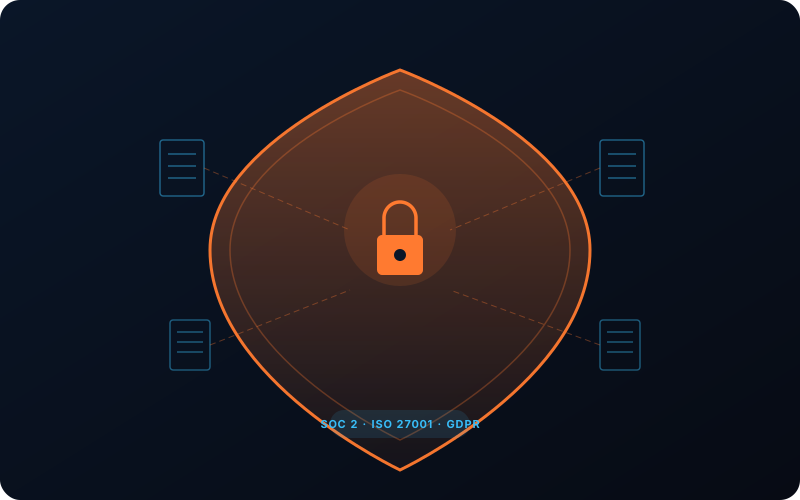
For UK law firms, security isn't a feature — it's the foundation. NetDocuments was built from the ground up with a Zero Trust security model, and we configure every layer to meet your firm's specific regulatory and client requirements.

Security shield with lock protecting documents, surrounded by SOC 2, ISO 27001 and GDPR certifications
Per-document encryption, ethical walls, and FIPS 140-2 Level 3 HSMs — security that's structural, not bolted on.
🏆

Certifications & Compliance

  • SOC 2 Type 2 — Security, Availability, and Privacy
  • ISO/IEC 27001 — Information Security Management
  • ISO/IEC 27017 — Cloud Security Controls
  • ISO/IEC 27018 — Protection of PII in Public Clouds
  • ISO/IEC 27701 — Privacy Information Management (GDPR)
  • FedRAMP — Moderate Authorization
  • GDPR — Full compliance with UK GDPR and EU GDPR
  • HIPAA / HITECH — Healthcare data protection
  • LGPD — Brazil's data protection law
🇬🇧

UK Data Residency

Your data stays in the UK. NetDocuments operates three datacentre facilities in the United Kingdom, ensuring:

  • Regional data residency — Documents never leave UK jurisdiction
  • Local cryptographic processing — Encryption operations performed within UK facilities
  • EU Model Clauses — Compliant international data transfer frameworks
  • Geo-aware content storage — Control where specific content is stored
🔑

Encryption Architecture

Every document is protected by multiple layers of encryption:

  • Per-Document Encryption — Each document receives a unique Object Encryption Key (OEK) generated using quantum-resistant random number generation
  • Repository-Level Master Key — A Master Encryption Key (MEK) governs the entire repository
  • Hardware Security Modules — Keys are protected in FIPS 140-2 Level 3 certified HSMs
  • Customer-Managed Keys (Optional) — Firms can hold their own encryption keys for ultimate control
🧱

Ethical Walls & Governance

  • Workspace Security Manager (WSM) — Industry-leading ethical wall enforcement at scale
  • Profile-Based Security — Document-level access control tied to client/matter
  • Data Loss Prevention — Automated controls preventing external data leakage
  • Comprehensive Audit Trail — Every action logged, searchable, and exportable
🛡

Zero Trust Access

  • Multi-Factor Authentication (MFA) enforced
  • Least-privilege access model
  • Continuous session monitoring
  • Comprehensive audit logging
🦠

Ransomware Protection

NetDocuments includes a circuit breaker that automatically detects ransomware-style mass upload patterns and halts them before damage spreads. Immutable version history ensures originals survive any attack.

Rapid point-in-time recovery is always available.

Who We Help

Built for Everyone in Your Firm

From the senior partner to the new trainee, every role benefits from a properly deployed document management system.

👔

Managing Partners

What You Care About: Firm reputation, client retention, risk mitigation, and competitive positioning.

How We Help:

  • Deploy a platform trusted by Skadden, Sheppard Mullin, and 7,000+ organisations
  • Protect client data with SOC 2, ISO 27001, and GDPR-compliant security
  • Gain competitive advantage with AI capabilities competitors lack
  • Ensure business continuity with 99.9% guaranteed uptime
  • Stop institutional knowledge walking out the door when partners retire

The Business Case: Poor data management costs the average firm £1.7m/year. A properly deployed DMS pays for itself through productivity gains, risk reduction, and client retention.

📊

Chief Operating Officers

What You Care About: Operational efficiency, budget predictability, process standardisation, and measurable ROI.

How We Help:

  • Predictable monthly pricing — no hardware, no surprise upgrade costs
  • Standardised workflows across all practice groups
  • Measurable adoption metrics — filing rates, search usage, AI engagement
  • Reduced IT overhead — no servers to maintain, no patches to deploy
  • Training programmes that drive real adoption, not just attendance

The ROI Story: Buchanan saved 1,500+ hours per year with a single AI app. Multiply that across your firm's workflows.

Fee Earners

What You Care About: Finding documents fast, working in tools you already know, less admin, more billable time.

How We Help:

  • File from Word, Outlook, and Teams — no separate application to learn
  • Semantic search — ask questions in plain English, get answers, not lists
  • Instant matter onboarding — every new matter starts with full context, not a blank page
  • AI assistant — summarise documents, draft responses, compare clauses in seconds
  • Mobile access — your documents on any device, securely

Your Experience: “Rather than taking your content to AI, we are bringing AI to your content.” Work smarter with AI that already knows your matters.

💻

IT Directors & CISOs

What You Care About: Security architecture, integration depth, admin overhead, vendor reliability, and compliance.

How We Help:

  • Deploy a platform with SOC 2 Type 2, ISO 27001/27017/27018/27701, and FedRAMP credentials
  • Zero Trust security model with MFA, least-privilege access, and comprehensive audit logging
  • 150+ native integrations including deep Microsoft 365 connectivity
  • REST API for custom integrations and automation
  • Per-document encryption with optional customer-managed keys
  • FedRAMP Moderate Authorization — rare among DMS providers

Architecture Deep-Dive: Built on AWS with Elastic-powered search. Three UK datacentres for regional data residency. Hardware Security Modules (FIPS 140-2 Level 3) for key management.

📋

Legal PAs & Support Staff

What You Care About: Filing documents quickly, finding things easily, supporting fee earners without friction.

How We Help:

  • One-click email filing with AI-assisted matter suggestions
  • Intuitive workspace navigation designed around how matters actually progress
  • Bulk filing and profile change tools
  • Version management that prevents “which version is current?” confusion
  • Training that focuses on your daily tasks, not abstract features
Frequently Asked Questions

Answers to Your Questions

Security & Compliance

Extremely secure. Every document is encrypted with a unique per-document key, generated using quantum-resistant random number generation. Keys are stored in FIPS 140-2 Level 3 Hardware Security Modules. The platform holds SOC 2 Type 2, ISO 27001, ISO 27017, ISO 27018, ISO 27701, and FedRAMP certifications.

For UK firms, data stays in three UK-based datacentres. NetDocuments provides regional data residency, local cryptographic processing, and EU Model Clauses for international transfers. You control where your content is stored through geo-aware storage policies.

NetDocuments offers two complementary approaches: Workspace Security Manager (WSM) for scalable ethical walls that enforce need-to-know access automatically, and Profile-Based Security (PBS) for document-level access tied to client/matter profiles. Both preserve existing permissions during migration.

Yes. NetDocuments provides consolidated activity logs, comprehensive audit trails, version history, and access reports. The platform's compliance documentation (SOC 2, ISO 27001, etc.) is available for client security reviews. TrustShare provides automated compliance questionnaire responses.

NetDocuments includes a circuit breaker that automatically detects and halts ransomware-style mass upload patterns. Immutable version history ensures originals survive any attack. Rapid point-in-time recovery is always available.

Migration

Migration timelines depend on data volume, source system complexity, and metadata quality. A typical mid-size law firm migration (500GB-2TB) takes 6-10 weeks from design to go-live. We provide detailed timelines during the Discovery phase.

Your folder structures are mapped and recreated within NetDocuments workspace architecture. We don't force a one-size-fits-all approach — we analyse how your firm works and design the target structure around your actual workflows.

Yes. We have experience migrating from all major DMS platforms including iManage (WorkSite), OpenText eDOCS, Worldox, Documentum, SharePoint, and network file shares. We use certified tools (ndImport, ndToolKit) with SQL-based transformation pipelines.

Our 9-phase methodology includes multiple validation checkpoints. Every document is reconciled against the source system during the Audit phase. We use the official NetDocuments audit template with exception reporting. Complete source system backups are maintained until migration is signed off.

Emails can be migrated from .PST files, Exchange, or Microsoft 365. ndMail provides AI-assisted matter suggestions for one-click filing post-migration.

AI & Context Graph

The Context Graph is the legal industry's first knowledge infrastructure that continuously maps relationships among every matter, document, communication, and person across your repository. It powers semantic search, instant matter onboarding, and permission-aware AI agents.

No. NetDocuments guarantees that your data is never retained by AI vendors, never reviewed by others, and never used to train large language models. AI operates within the DMS security boundary.

Standalone AI tools require you to upload documents — creating security risks and losing context. NetDocuments brings AI to your content within its secure environment. With ndConnect (MCP), external tools like Claude and ChatGPT can connect to your knowledge graph with permission-aware access.

The ndMAX suite includes: Legal AI Assistant (natural language document queries), AI App Builder (custom legal AI apps), PatternBuilder MAX (document automation), Copilot integration (Microsoft Teams/Outlook), and semantic search powered by the Context Graph.

Implementation & Cost

A typical implementation takes 10-16 weeks from Discovery to Go-Live, depending on firm size, complexity, and migration scope. We provide a detailed project plan during the Discovery phase.

Costs vary based on firm size, migration volume, and scope of services. NetDocuments operates on predictable monthly per-user pricing with no hardware costs. Implementation and migration services are quoted as fixed-fee engagements. Contact us for a tailored proposal.

We combine deep NetDocuments certification with real-world law firm experience. We don't just configure software — we understand how law firms work because we've been in them. Our methodology is proven, our training drives adoption, and we stay engaged after go-live.

NetDocuments is the only cloud-native DMS built specifically for legal with an industry-first Context Graph, AI that works within your security boundary, unmatched Microsoft 365 integration, and 25+ years of legal expertise. Legacy on-premises systems can't match its agility, and generic cloud DMS platforms can't match its legal-specific depth.

We're building our UK client base. In the meantime, NetDocuments' 7,000+ customers include Skadden, Sheppard Mullin, Davis Wright Tremaine, Husch Blackwell, Winckworth Sherwood, Forsters, and the Council of Europe.

About Us

Certified Expertise. Real-World Experience.

Agentic Law is a UK-based NetDocuments Certified Partner specialising in implementation, migration, AI deployment, and systems integration for law firms and legal departments.

We believe that document management is not an IT project — it's a transformation of how your firm creates, manages, and leverages its collective knowledge. Done right, it changes how your firm works.

Our Approach

We start with your firm's workflows, not our technology stack. We design solutions around how your fee earners actually work. We measure success by adoption rates, not go-live dates. And we stay engaged long after deployment to ensure your investment compounds value.

Our Certifications

NetDocuments Certified File System Migration
  • NetDocuments Certified File System Migration
  • NetDocuments Partner Welcome Course
  • NetDocuments Implementation Course
  • NetDocuments Sales Certification
  • PatternBuilder Sales Certification
  • SetBuilder Sales Certification
  • ndMAX Sales Certification
  • ndToolKit Partner Training
Start a Conversation

Tell Us About Your Firm

Tell us about your firm and what you're trying to achieve. We'll respond within one business day.

Location

United Kingdom

Response Time

Within one business day

Why Reach Out?

  • Free initial consultation
  • Tailored migration assessment
  • Fixed-fee project scoping
  • No obligation